How to Configure Timextender Data Integration
Info
Relates to Timextender 6024.1 and later versions
This article describes how to get started with Timextender Data Integration.
Sign In
Once you have an account, go to app.timextender.com and sign in. You need to have the Data Estate Admin permission to configure instances. Review and set permissions using the Profile & preferences page.
Add Instances
Ingest, Prepare, and Deliver instances are the building blocks of your data estate, so setting up instances is the place to start.
To add your first instance, go to Data Estate > Instances, click Add new instance and click the type of instance you want to add.
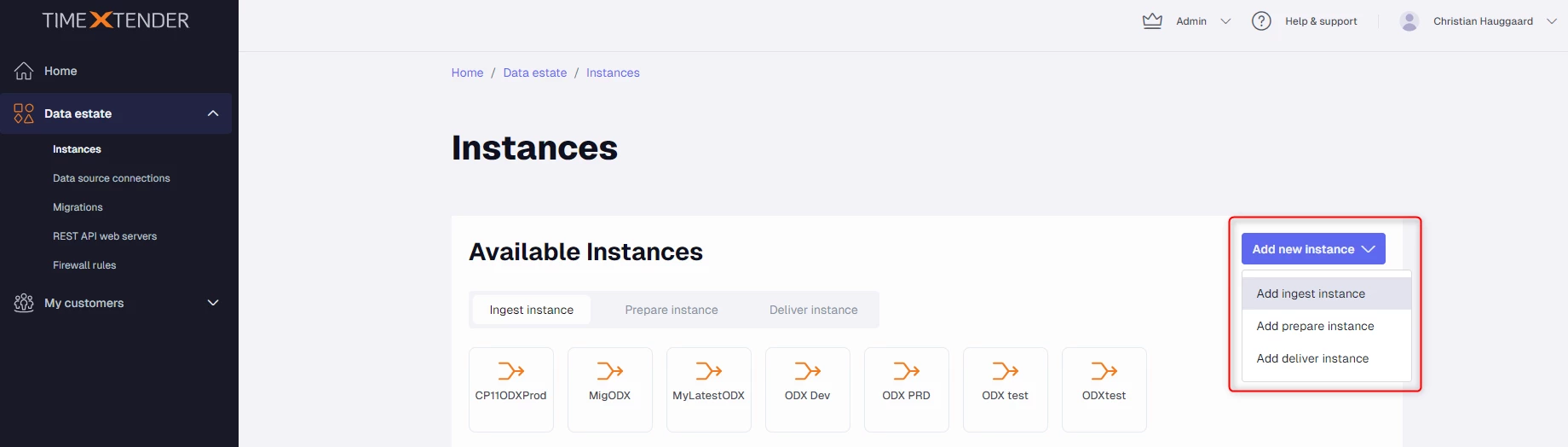
See more details on adding specific instances here.
Add Data Sources
Install the Software
Configure the Firewall
Discussed in the community
Looking for related questions…
Didn't find your answer? Ask the community about this page — questions are answered by Timextender experts, partners and other users.