Create a Timextender Application Server in Azure
Overview
This guide will cover how to deploy and configure your environment using the Azure Marketplace App: Timextender Application Server. The deployment of the Azure resources will vary depending on Azure resource availability. Deploying the necessary Azure resources generally takes ~15 minutes.
Complete the following steps to configure Timextender Application Server on Azure:
- Deploy the Timextender Application Server - Sign-in to https://portal.azure.com - Navigate to the Timextender Application Server Azure Deployment or type "Timextender Application Server" In the Search bar. - Click Create. - Configure your desired properties for the Virtual Machine. - Click Create.
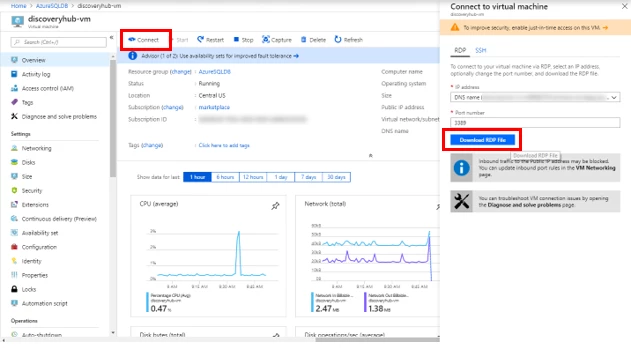
- Connect to the Virtual Machine - Once deployment is complete, navigate to the Virtual machine & Click Connect - Select RDP and download the RDP file. - Open the RDP file once it has downloaded and click Connect - Enter in the credentials to connect to the virtual machine that you created earlier and click OK to connect.
- Install Timextender Data Integration and Timextender Ingest Service on your Timextender Application Server and then setup your instances. For more information see the below article:
Discussed in the community
Looking for related questions…
Didn't find your answer? Ask the community about this page — questions are answered by Timextender experts, partners and other users.