Disaster & Recovery Procedures
In this article, you will read about disaster and recovery procedures in Data Enrichment. All Data Enrichment cloud databases are based on SQL Azure Standard with a retention time of 35 days. Databases have a Point-in-time backup so databases can be restored to a certain point in time for the past 35 days in the event of a Disaster. Backup can be transferred to blob storage for a longer retention period of up to 10 years.
Requesting a Restore
If a restore of an Data Enrichment database is needed, please create a support ticket by emailing support@timextender.com with the following subject:
*Subject: EXTABLES RESTORE REQUEST <ACCOUNT NAME> *
and please include a point in time to restore to. If the request is urgent and should get the highest priority please add URGENT to the subject.
Restore Procedure
The following are procedures for Support personnel to perform a Point-In-Time restoration:
- Log Into AZURE PORTAL
- Open SQL databases and locate the database with a name specified in the Customer request ticket.
- Open the database administration page
- Click on Restore
- Select a restore Date and Time
- Choose a database name with a Database Name and time of restore point.
- Click on OK.
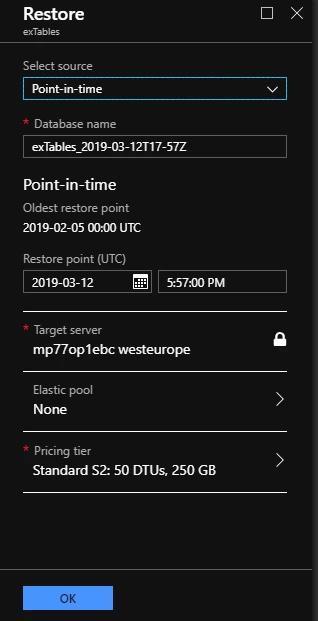
- Now Azure should perform a backup and you should be notified if the restore is successful or not.
- Log in to the database using SQL Server Management Studio.
- Rename the current database to
<databasename>old<restore_date>(e.g. exTablesCustomer1_old_2019-03-12) - Rename the restored database exTablesCustomer1_2019-03-12T17-41Z to exTablesCustomer1
- Test logging in through the Data Enrichment Client.
- Notify the Customer of the completed restore.
Discussed in the community
Looking for related questions…
Didn't find your answer? Ask the community about this page — questions are answered by Timextender experts, partners and other users.