TDI execution from Orchestration
Problems that arise when executing Timextender Data Integration tasks and execution packages from Orchestration.
An instance is missing from Orchestration
Some instances do not appear as packages when syncing the TDI data source, or an instance is missing from the dropdown when creating an Ingest, Prepare or Deliver package.
Add a new execution package — one other than the default execution package — in the relevant instance, deploy the instance, then sync the TDI data source again or add the package manually.
The Ingest or Execution Service is not running
Error
Timextender Orchestration is still waiting for task to start execution...
The TDI services must be running for Orchestration to execute TDI packages.
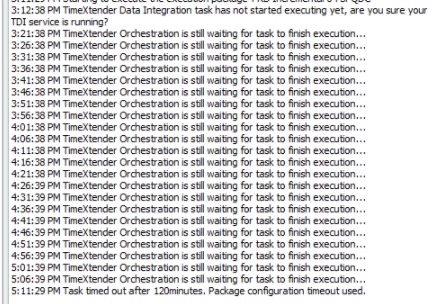
- Connect to the server running the TDI Ingest or Execution Service.
- Go to Start → Services.
- Find the service and confirm it is running.
Check the right server
TDI services can be installed on multiple servers. Check the server connected to the TDI instance of the failing task or package.
A Prepare or Deliver instance is not set up in the Execution Service
If you execute an execution package in a Prepare or Deliver instance that has not yet been set up in Timextender Execution Service Configuration:
Error
Timextender Data Integration task has not started executing yet. Task timed out after 10 minutes. Task's timeout used.
- Run Timextender Execution Service Configuration. Confirm its version matches the installed version of Timextender Data Integration.
- Sign in.
- Select the relevant instances.
- Click Save.
Firewall is blocking Service Bus
This presents as if the service were not running.
Error
Service Bus: Receiving message failed:
Azure.Messaging.ServiceBus.ServiceBusException: A connection attempt failed because the connected party did not properly respond after a period of time, or established connection failed because connected host has failed to respond ErrorCode: TimedOut (ServiceCommunicationProblem). For troubleshooting information, see https://aka.ms/azsdk/net/servicebus/exceptions/troubleshoot. ---> System.Net.Sockets.SocketException: A connection attempt failed because the connected party did not properly respond after a period of time, or established connection failed because connected host has failed to respond
at System.Runtime.ExceptionServices.ExceptionDispatchInfo.Throw()
at Microsoft.Azure.Amqp.AsyncResult.End[TAsyncResult](IAsyncResult result)
at Microsoft.Azure.Amqp.Transport.AmqpTransportInitiator.<>c.<ConnectAsync>b__17_1(IAsyncResult r)
at System.Threading.Tasks.TaskFactory`1.FromAsyncCoreLogic(IAsyncResult iar, Func`2 endFunction, Action`1 endAction, Task`1 promise, Boolean requiresSynchronization)
--- End of stack trace from previous location where exception was thrown ---
at System.Runtime.ExceptionServices.ExceptionDispatchInfo.Throw()
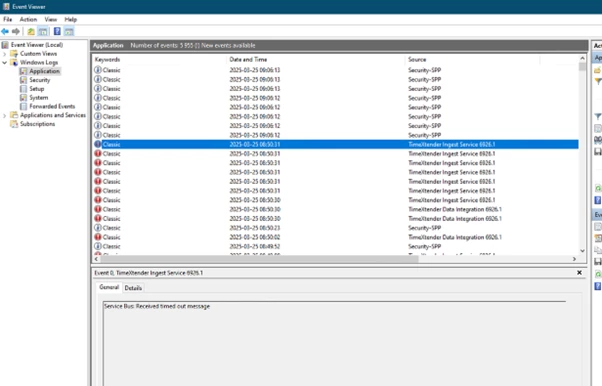
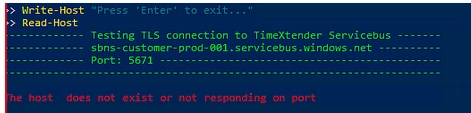
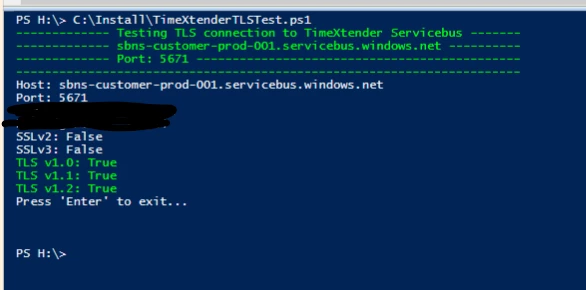
Confirm the firewall is configured as described in Configure your firewall - Azure service bus. If Windows Event Viewer shows errors like the above under Windows → Application, ensure AMQP ports 5671 and 5672 are open.
A PowerShell test script is available from Support to check the ports.
Service settings are incorrect
For the Execution Service:
- Connect to the server running the TDI execution service.
- Run the execution service configuration.
- Deselect all instances and finish the wizard.
- Run the configuration again, select the relevant instances, and click Save.
- Restart the execution service.
For the Ingest Service:
- Connect to the server running the TDI ingest service.
- Run the ingest service configuration and finish the wizard.
- Restart the ingest service.
Downloads
Discussed in the community
Looking for related questions…
Didn't find your answer? Ask the community about this page — questions are answered by Timextender experts, partners and other users.