Troubleshooting Timextender Orchestrator
Symptoms
Error while using Process Map in Timextender Orchestrator. The state of packages is shown as running, even though they seem to be stuck.
Error
Packages shown as running.
Error
Ingest processes shown as running.
Resolution using the full version
To resolve this issue, follow these steps.
- Navigate to the portal.
- Select Process Management
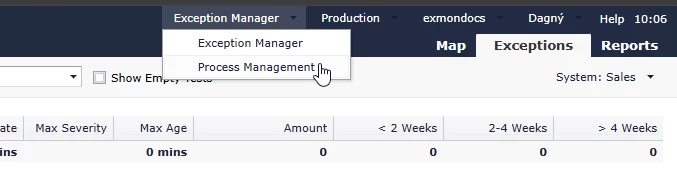
- Select Process Queue

- Choose the packages that you want to stop or flush from the queue.
Resolution using the limited version
To resolve this issue, follow these steps:
- Navigate to the following URL https://{YourCustomerKey}.exmon.com/dg/{YourSystemId}/QP/ProcessQueue replacing {YourCustomerKey} and {YourSystemId}
- Choose the packages that you want to stop or flush from the queue.
Finding Your CustomerKey
If you navigate to your portal you can see your customerkey as the first word of your URL.
You can view your portal path by navigating in your desktop client to Tools > Configuration > Portal and viewing the field, Portal Path.
Finding Your SysemId
You can view the system Id in the desktop client. Navigate to General > Systems and open your desired system. The SystemId will now be visible in the footer.

Discussed in the community
Looking for related questions…
Didn't find your answer? Ask the community about this page — questions are answered by Timextender experts, partners and other users.