How to resolve Ingest Instance error: Property 'OwnerId' does not exist for 'object specified'
Symptoms
You receive the following error when you execute an Ingest Instance Transfer task:
Failure
System.Data.SqlClient.SqlException (0x80131904): Property cannot be updated or deleted.
Property 'OwnerId' does not exist for 'object specified'
Cause
You are using a pre-existing SQL database as Ingest Instance storage.
When you add "SQL Server Data Storage", the Ingest Instance expects to create and configure its own database. Since you are using an already existing database, it is missing an extended property OwnerId. The Ingest Instance validation is failing because it expects the extended property OwnerId at the database level.
Resolution
- Create a new SQL Server Data Storage from within the Ingest Instance
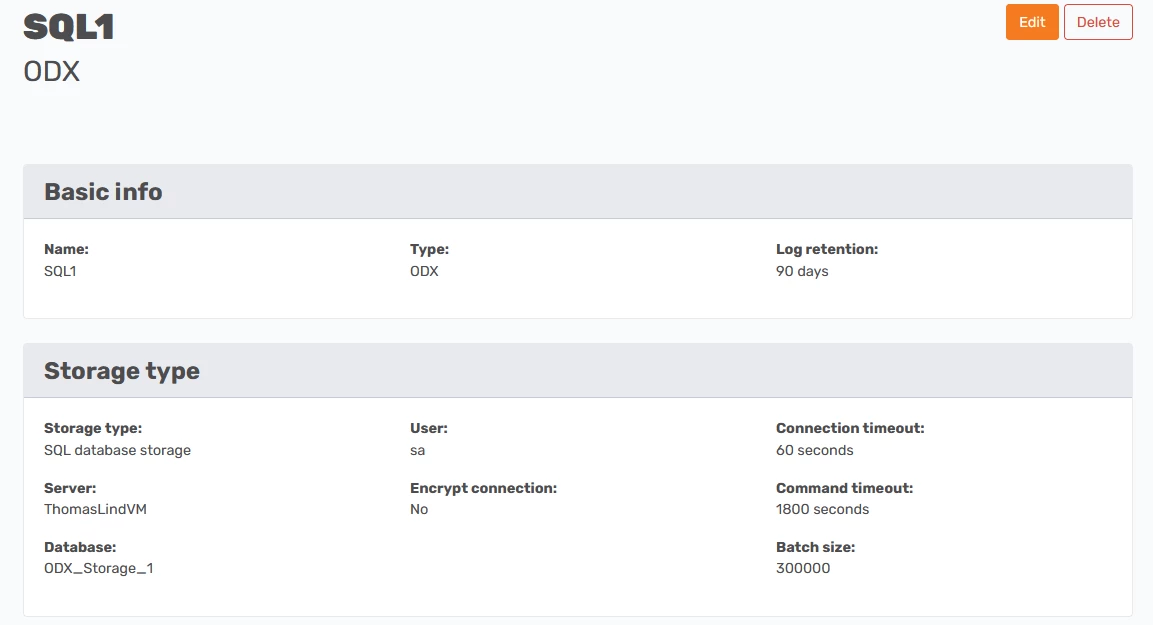
- If you need to use a pre-existing SQL database for the Ingest Instance storage
- In SQL Server Management Studio (SSMS), right-click on the database for the Ingest Instance storage -> Properties -> Extended Properties
-
Manually add an extended property as shown below
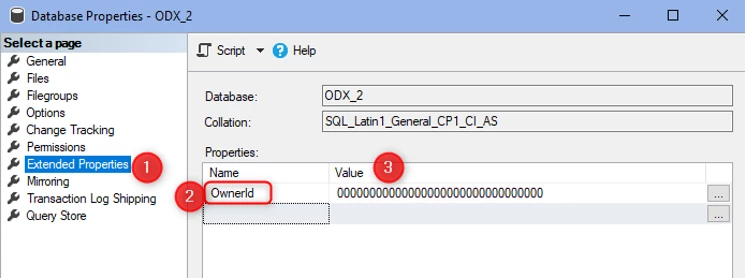
Name: OwnerId Value: 00000000000000000000000000000000 3. This will enable the Ingest Instance to take ownership of the database.
Discussed in the community
Looking for related questions…
Didn't find your answer? Ask the community about this page — questions are answered by Timextender experts, partners and other users.