How to open a previous version of a Timextender Classic project
When you open a project, the default version is always the latest saved version of the project. To open a previous version of a project, follow the steps below:
- Click on File > Open. Or, use the shortcut key CTRL+O.
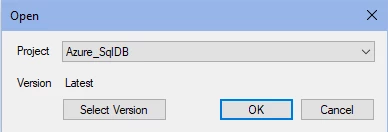
- (optional) If you have multiple projects, select a project in the project drop-down list.
- To select a previous project version, click Select Version. This will show a list of previous versions of the project as shown below.
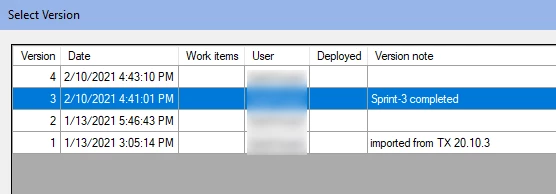
- Select a version and click OK. This will return you to the project open dialog, with the selected version shown.
- Click OK to open this version of the project.
Best Practices
- Periodically backup your Timextender Repository database which contains all your projects and their versions.
- Write a descriptive Version note for project versions, especially after reaching major milestones in design. This may help restore or revert-back to a working configuration when needed.
Discussed in the community
Looking for related questions…
Didn't find your answer? Ask the community about this page — questions are answered by Timextender experts, partners and other users.