What is a Business Unit Data Staging Area in Timextender Classic
A Business Unit Data Staging Area is a temporary storage area between the data sources and a data warehouse.
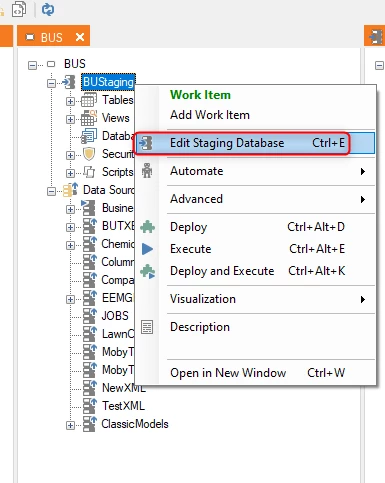
Before a Business Unit can be used to load data from data sources, a Staging Database needs to be configured and created. Right-click on the Business Unit and select “Edit Staging Database” to open the dialog for this.
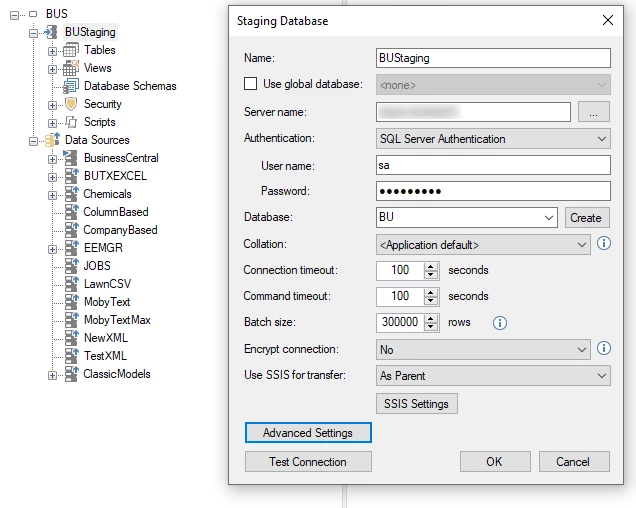
Configure a SQL Server Instance and Database Name to be used for the Business Unit Staging Database. If the database has not been created yet, click the “Create” button to create a new database with the name provided.
The staging area is mainly used to quickly extract data from its data sources, minimizing the impact on those data sources.
After data has been loaded into the staging area, the staging area is used to combine data from multiple data sources, perform transformations, validations, and data cleansing. Data may often be transformed into a star schema prior to loading into a data warehouse.
In Timextender, the Business UnitStaging Database is used to store data that has been extracted from data sources. There is a 1:1 relationship between staging databases and business units. In order to have multiple staging areas, then you would have to have multiple business units. You need at least one business unit within a project, thus you will always have at least one staging area.
In Timextender you cannot load directly between data sources and a data warehouse.
Discussed in the community
Looking for related questions…
Didn't find your answer? Ask the community about this page — questions are answered by Timextender experts, partners and other users.