Create or Modify Views in Data Enrichment
In this article, you will learn how to create or modify views in Data Enrichment. Setting for Filters and Groupings can be stored in Views. Views can be Private and only visible to the user creating the View or Public and can be accessible to all users.
Create your view
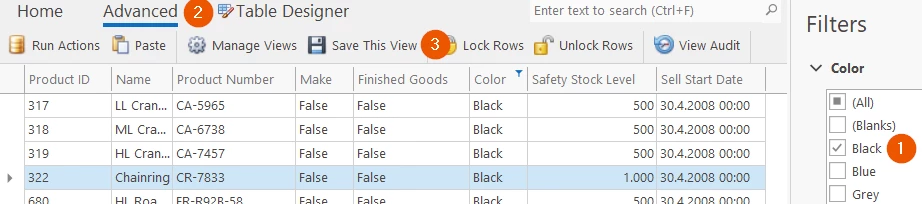
- First, filter the data in the Table
- Click on Advanced
- Save this View
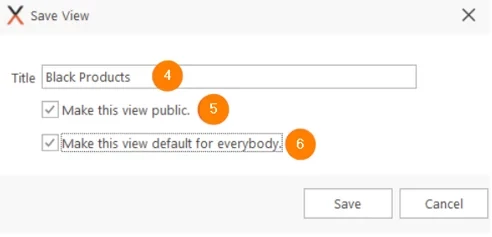
- Type a Title
- Check Make this view Public
- Make this view default for everybody
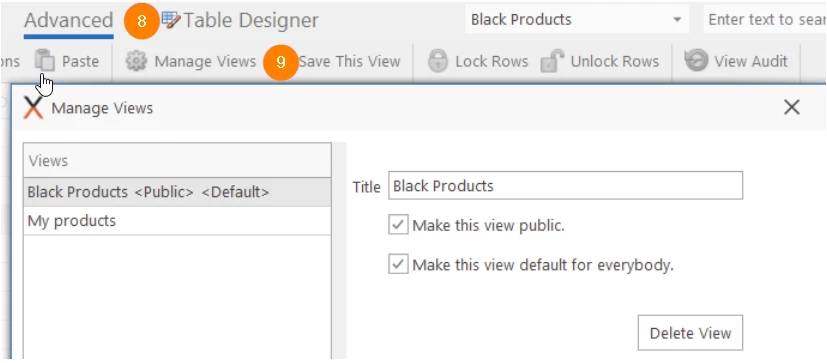
- If multiple views have been defined a dropdown will appear at the Top

- To Modify Views Click Advanced
- To manage your views, click Manage Views. Changing already saved views can be modified within this Dialog.
Discussed in the community
Looking for related questions…
Didn't find your answer? Ask the community about this page — questions are answered by Timextender experts, partners and other users.