Create SQL Login users to Data Enrichment service
How to access Data Enrichment data through SQL connection
Behind the scenes, Data Enrichment data is stored either in SQL Azure Database or in Microsoft SQL Server.
Within the Data Enrichment, administrators can create new SQL Logins to access the data.
Common scenarios are:
- Create a read-only user on specific projects to view data in Excel or Power BI
- Create a write user the imports data into Data Enrichment from Azure Data Factory or Timextender Classic
Create a user and set privileges
- Open Settings by clicking the "Gear" icon in the bottom left corner

- Open "Database User Configuration"
- Select Add and create a unique name and generate the password
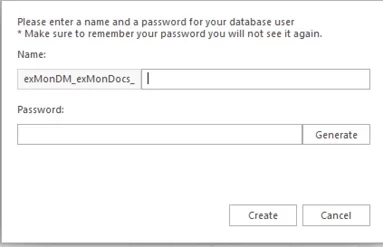
!!! note "Note" The password can not be recovered so make sure to store it in a secure place. If you forget the password the only option is to generate a new one. 4. Select which schemas and what privilege the user should have
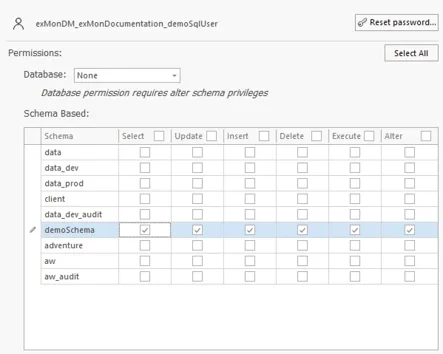
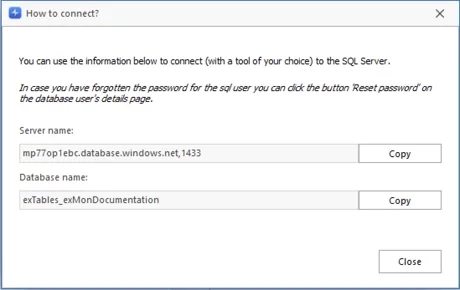
- Save and click to How to Connect to get details regarding the database behind Data Enrichment.
Discussed in the community
Looking for related questions…
Didn't find your answer? Ask the community about this page — questions are answered by Timextender experts, partners and other users.