How do I send parameters to Query and Compare Query?
Designing Queries With Parameters
Query parameters are added to queries on the format:
The default value is used when no parameter is used when executing a task through Timextender Data Quality Execution Agent.
Defining a datatype value makes the Portal provide an accurate dialog for parameters, making executing from the Portal easier.
The preview value is only used when testing the query in Timextender Orchestration and Data Quality.
Note
If you haven't already, take a look at the Query Walkthrough
Worked Example
You can add multiple parameters or reuse the same parameter. In the example below, we select products by color and price range. When testing it in Timextender Orchestration and Data Quality we select black products that cost between 0 and 200.
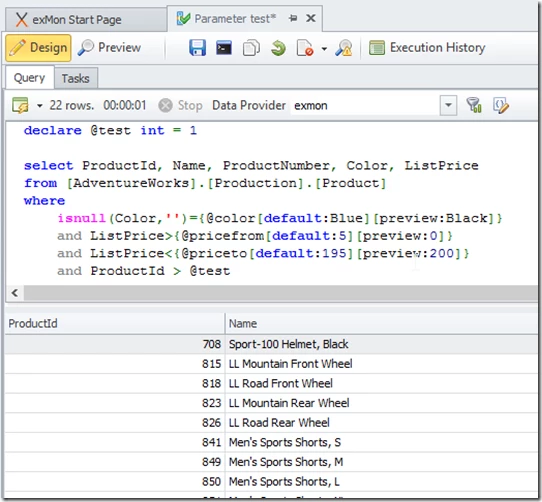
Running Queries With Parameters
Queries that define parameters can be executed with or without parameters in the command line. If you want your value to be the same for most of your executions, you can define a default value. That way, if you chose to not execute the task with parameters the default will be used.
Examples to execute the query above:
- epcmd --query 1 --@color "Orange" --@pricefrom 10 --@priceto 190
- epcmd --query 1 --@pricefrom 10
- epcmd --query 1 --@color "Blue"
- epcmd --query 1
Adding To Object Groups
You can add the same query multiple times into the object group to run with different parameters. Note that object groups with duplicate queries can not be added to Process Maps on the Portal.
Discussed in the community
Looking for related questions…
Didn't find your answer? Ask the community about this page — questions are answered by Timextender experts, partners and other users.