Import CSV to a database through a DataTransfer
Timextender Orchestration & Data Quality can easily import CSV files through the DataTransfer functionality. Here are some tips and tricks. If you have a CSV that needs regular import into a SQL Server database, the DataTransfer package type can be used to automate that task.
Create a DataTransfer
For a simple CSV that needs importing the tasks are as follows:
- Create a new Package of type Data Transfer
- In the Source pane select PowerShell as a Data Provider and enter the following script
Import-Csv -Path 'C:\path\filename.csv' 3. Click Preview
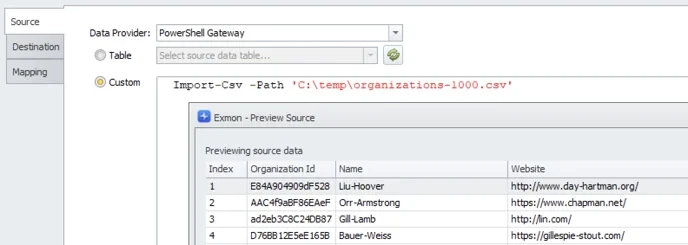
- In the Destination pane select or create the destination table and in the Mapping pane map the CSV columns to the SQL columns.
- Save, run and verify that the data is transferred
Tips & tricks
- If your service is running in the cloud, Import-Csv in only available through Gateways. Install Timextender Gateway on a machine and create a PowerShell data provider within the Gateway, and finally select that Data Provider
- DataTransfer doesn't support column headers containing periods (.) in column names. You can rename the column headers as part of the script as follows:
-
# readthe filecontents
$content = Get-Content -Path 'C:\temp\organizations-1000.csv'
# Remove . in columnheaders
$content[0] = $content[0].Replace(".","_")
#returnobjects
$content | ConvertFrom-Csv - You can select specific columns from the CSV file and filter the results with Select-Object and Where-Object functions. Here is an example to only select the Index, Name and Country columns and only return the entries from Finland - Import-Csv -Path 'C:\temp\organizations-1000.csv' | Select-Object Index,Name,Country | Where-Object -Property Country -eq "Finland"
-
If the CSV file doesn't contain column headers you can add them as part of the Import-Csv or ConvertFrom-Csv function
- Import-Csv -Path 'C:\temp\organizations-1000.csv' -Header "Index", "Organization Id", "Name", "Website", "Country", "Description", "Founded", "Industry", "Number of employees"
Discussed in the community
Looking for related questions…
Didn't find your answer? Ask the community about this page — questions are answered by Timextender experts, partners and other users.