View Dependencies
In this article, you will read about viewing dependencies in Timextender Orchestration and Data Quality. If you want to make a process, data provider or other changes you need to utilize View Dependencies. This feature can both show you dependent objects that depend on a selected object as well as which object the selected object depends on.
Worked example
An example of this could be a compare query. If the query is placed inside an object group, that object group will depend on the compare query. Furthermore, the compare query uses data providers to query, users to send emails to, and data types to group by. These are things the compare query depends on, and if deleted, the compare query will not work as originally intended.
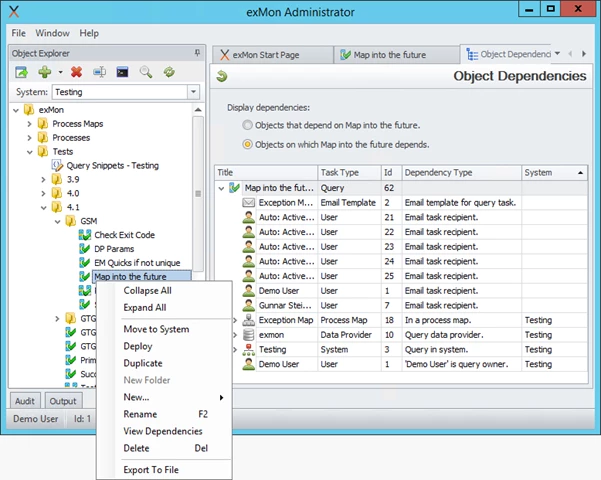
To use this feature:
- Open Timextender Orchestration and Data Quality
- Right-click on the object you wish to see the dependency of
- Click View Dependencies
Discussed in the community
Looking for related questions…
Didn't find your answer? Ask the community about this page — questions are answered by Timextender experts, partners and other users.