Add a IBM Informix Data Source in Timextender Classic
Timextender can extract data from IBM Informix databases.
Adding a Informix Data Source
- Open a business unit, right click Data Sources, click Data Sources and then click Add Informix Data Source. The Add Informix Data Source window opens.
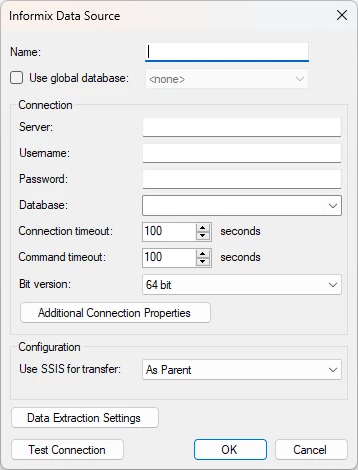
- In the Name box, type a name for the data source.
- In the Server Name box, enter the server name.
- In the Database box, enter the database.
- In the Username box, enter your username. Enter the corresponding password in the Password box.
- (Optional) Click Data Extraction Settings if you want to limit the objects brought into Timextender before the data selection stage. For more information, see Filtering What Objects to Extract.
- Click OK to add the data source.
Discussed in the community
Looking for related questions…
Didn't find your answer? Ask the community about this page — questions are answered by Timextender experts, partners and other users.