Create a link to an underlying data source
In this article, you will read about creating a link to an underlying data source in Timextender Orchestration and Data Quality. To fix exceptions created by Timextender Orchestration and Data Quality, users most often need to go into an underlying data source. If the query contains an ID from the underlying system, the exception can be set up to contain a link to the data of the data source itself. This offers users a much quicker way to fix exceptions that arise.
Worked example
Let's say that the user has a query to check upcoming due dates in the sales pipeline. If an exception rises from this query, the user may also want to open a form in Sharepoint to provide further details. From there, the user may want to contact the owner of the sales opportunity to resolve the issue.
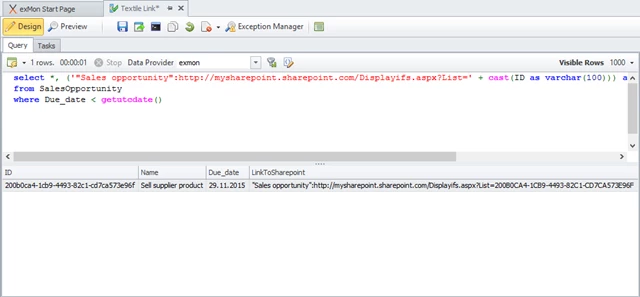
To make a link from each exception to the Sharepoint form, the user first creates a query like this:
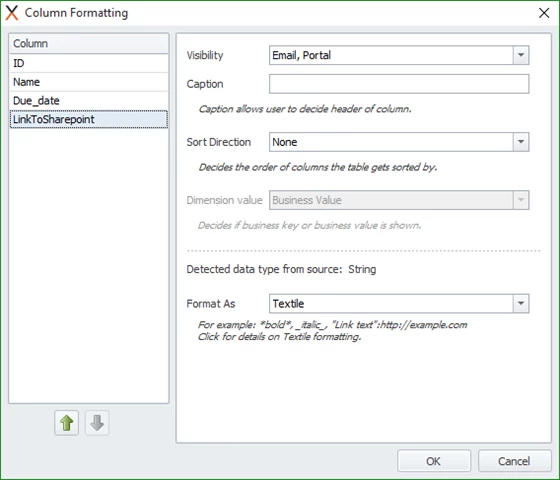
Now the user opens Column Formatting and changes the LinkToSharepoint column to format as Textile:
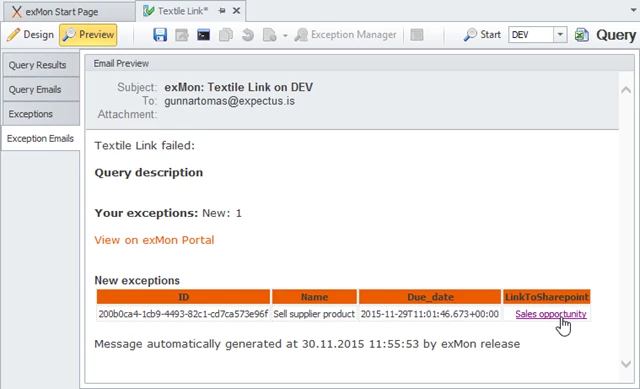
Expected result:
Discussed in the community
Looking for related questions…
Didn't find your answer? Ask the community about this page — questions are answered by Timextender experts, partners and other users.