Extract-Refresh Data Sources for Tableau Online, in Timextender Orchestration and Data Quality
In this article, you will read about how to Extract-Refresh Data Sources for Tableau Online, in Timextender Orchestration and Data Quality. This provides better insight into the refreshes and more control over the refresh schedule.
Extract Refresh
- Start by saving the following python scripts to the C: drive
- Name of script: Refresh_tableau_online_extract.py
import sys
import argparse

from API_Handler import APIHandler

# ----------------------------------------------------
# ----------------------------------------------------
# ----------------------------------------------------

parser = argparse.ArgumentParser(description='Bakvordur Datapump')
parser.add_argument('--server', required=True, help='Type of .')
parser.add_argument('--site_name', required=True, help='Type of .')
parser.add_argument('--user', required=False, default = None, help='Type of .')
parser.add_argument('--pw', required=False, default = None, help='Type of .')
parser.add_argument('--personal_access_token_name', required=False, default = None, help='Type of .')
parser.add_argument('--personal_access_token_secret', required=False, default = None, help='Type of .')
parser.add_argument('--datasource', required=True, help='Type of .')
args = parser.parse_args()

pumpConfig = {}
pumpConfig['server'] = args.server
pumpConfig['site_name'] = args.site_name
pumpConfig['user'] = args.user
pumpConfig['pw'] = args.pw
pumpConfig['personal_access_token_name'] = args.personal_access_token_name
pumpConfig['personal_access_token_secret'] = args.personal_access_token_secret
pumpConfig['datasource'] = args.datasource

# ----------------------------------------------------
# ----------------------------------------------------
# ----------------------------------------------------

apiHan_refresh = APIHandler(pumpConfig['server'], pumpConfig['site_name'], pumpConfig['user'], pumpConfig['pw'], pumpConfig['personal_access_token_name'], pumpConfig['personal_access_token_secret'], pumpConfig['datasource'])
test = apiHan_refresh.RunRefresh()

temp = ''
Name of script: API_Handler.py
from sys import exec_prefix
import requests
import xml.etree.ElementTree as ET
import time
import datetime
import logging

import tableauserverclient as TSC
from tableauserverclient.server.endpoint.workbooks_endpoint import Workbooks

class APIHandler(object):
    def __init__(self, server, site_name, user, pw, personal_access_token_name,  personal_access_token_secret, datasource):
        self.server = server
        self.site_name = site_name
        self.user = user
        self.pw = pw
        self.personal_access_token_name = personal_access_token_name
        self.personal_access_token_secret = personal_access_token_secret
        self.datasource = datasource

        self.Initialize()

    def Initialize(self):

        try:
            if self.user is 'None' and self.pw is 'None':
                tableau_auth = TSC.PersonalAccessTokenAuth(self.personal_access_token_name, self.personal_access_token_secret, site_id=self.site_name)
                self.server = TSC.Server(self.server, use_server_version=True)
                self.server.auth.sign_in(tableau_auth)
                print('Signed in with Token.')

            elif self.personal_access_token_name is 'None' and self.personal_access_token_name is 'None':
                tableau_auth = TSC.TableauAuth(self.user, self.pw, site_id=self.site_name)
                self.server = TSC.Server(self.server, use_server_version=True)
                self.server.auth.sign_in(tableau_auth)
                print('Signed in with user name')
        except Exception as e:
            print('Initialization failed with error: ' + str(e))
            exit(1)

    def RunRefresh(self):

        all_datasources, pagination_item = self.server.datasources.get()

        for dSource in all_datasources:
            if dSource.name == self.datasource:
                try:
                    datasource = self.server.datasources.get_by_id(dSource.id)
                    refreshed_datasource = self.server.datasources.refresh(datasource)
                    self.HandleRefreshWait(refreshed_datasource.id)
                except Exception as e:
                    print('Refresh failed with error: ' + str(e))
                    exit(1)

    def HandleRefreshWait(self, jobId):
        complete_time = None
        counter = 0
        started = False
        sleep_timer = 10
        while complete_time is None:
            extract = self.server.jobs.get_by_id(jobId)

            if str(extract._finish_code) == "0":
                complete_time = (extract._completed_at).strftime('%Y-%m-%d %H:%M:%S')
            else:
                if extract.started_at is None:
                    print("Refresh has not started.")
                else:
                    if started == False:
                        print("Refresh started at " + (extract._started_at).strftime('%Y-%m-%d %H:%M:%S') + '.')
                        started = True
                    if counter == 0:
                        print("Refresh is running.")
                    else:
                        print("Refresh is still running.")

                    counter += 1

            if complete_time is None:
                time.sleep(sleep_timer)

        refresh_time = counter*sleep_timer
Next steps
- Create a Package for the refresh extract for the data source. It is necessary to create a package for each data source.
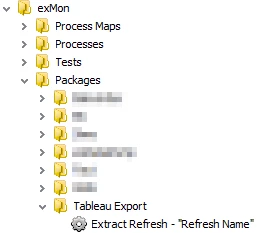
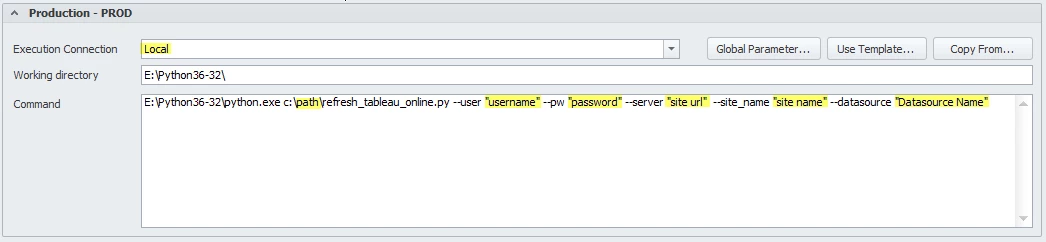
- In the extract refresh package put the following information in the Production - PROD command
- Using username and password:
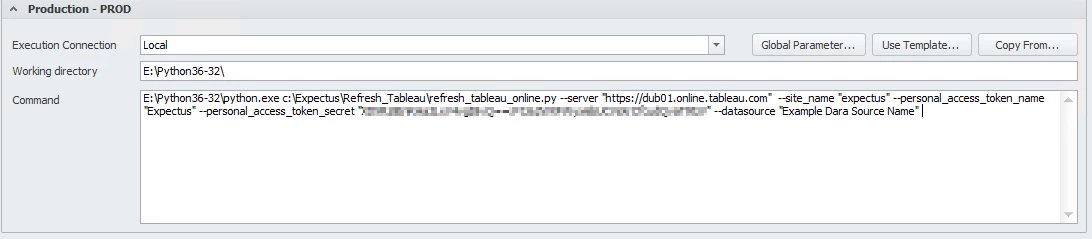
- Using personal access token
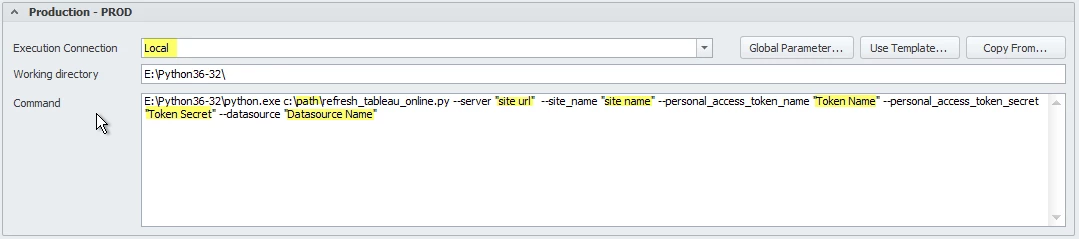
- Identify the Execution Connection
- Establish the location of the python script in the command window. The highlighted parameters that can be determined in the Tableau online server.
Note
We highly recommend using Global Parameter to hide the password used in the command window for increased security
Execution Example
- site url and site name
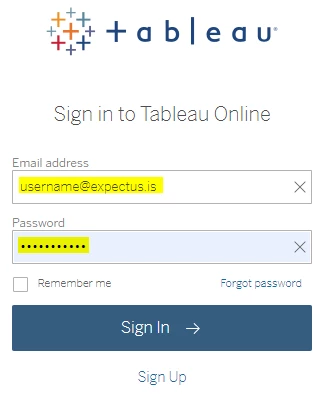
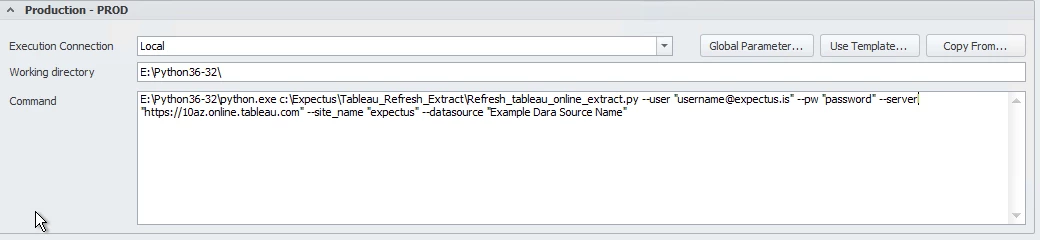
- Using username and password to sign into the tableau online server
- Username and Password
- Personal Access Token Name and Personal Access Token Secret
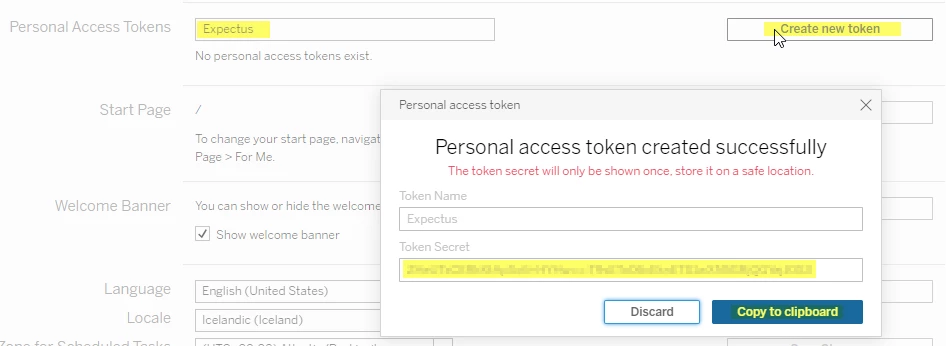
Create access token
In this section, you will learn how to create an access token for the tableau online server.
- Name the Personal Access Token
- 'Create New Token'
- Copy the Personal Access Token Secret
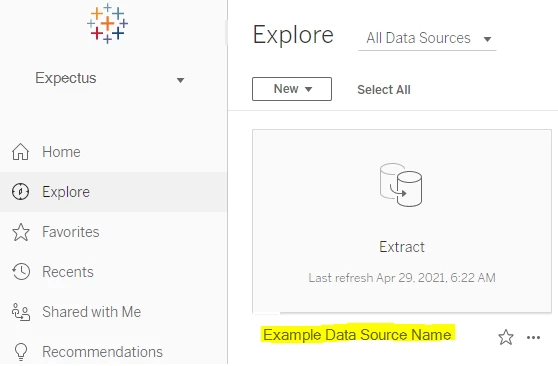
Data source name:
In the Tableau online server the name of the data source can be identified
Given that the python scripts have been located in *C:\location* the command for the Extract Refresh package will be as follows:
Signing in with username and password
Signing in with Personal Access Token
Finally, save and deploy the package.
Command to copy.
Working directory: E:\Python36-32\
Command:
E:\Python36-32\python.exe c:\path\refresh_tableau_online.py --user "username" --pw "password" --server "site url" --site_name "site name" --personal_access_token_name "Token Name" --personal_access_token_secret "Token Secret" --datasource "Datasource Name"
Discussed in the community
Looking for related questions…
Didn't find your answer? Ask the community about this page — questions are answered by Timextender experts, partners and other users.