Find out if a file is open in another program
If you have a process which fails when a file is open and locked in another program, you can use PowerShell in Timextender Data Quality to monitor and notify you when that happens.
- Create a new Query in Timextender Data Quality by right-clicking the Data Quality > Tests folder
- Create a new query & name it Powershell Demo
- Select the PowerShell Data Provider
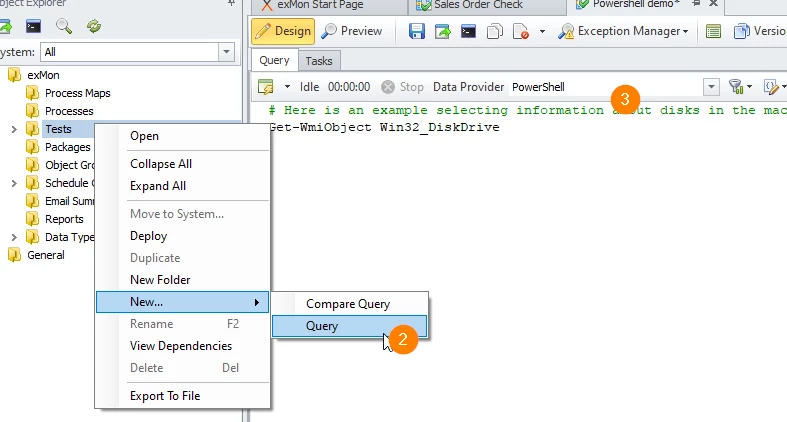
- Add the following PowerShell script to the Query window:
# The file to check for
$path = 'C:\temp\test.xlsx'

# Check if we can get an exclusive read on a file
# Returns the exception if unsuccessful
# Returns empty results if it reads successfully

# Create the result DataTable
$timeXtenderResult= New-Object system.Data.DataTable
$col1 = New-Object system.Data.DataColumn Error,([string])
$timeXtenderResult.columns.add($col1)

# Read the file
$text = $null
try {
    $file = [System.io.File]::Open($path, 'Open', 'Read', 'None')
    $reader = New-Object System.IO.StreamReader($file)
    $a = $reader.ReadLine()
    $reader.Close()
    $file.Close()
} catch [Exception] { $text = $_.Exception.Message }

# Succeeded?
if($text -eq $null) {
    # Yes, no error message
} else {
    # Add Row
    $row = $timeXtenderResult.NewRow();
    $row.Error = $text;
    $timeXtenderResult.Rows.Add($row)
}
Discussed in the community
Looking for related questions…
Didn't find your answer? Ask the community about this page — questions are answered by Timextender experts, partners and other users.