Agile Team Development
How modern Timextender development teams take an agile approach to projects: iterative workflows and coordinated team development with work items and version control, to deliver small, business-value driven development with clear traceability and reduced risk.
In this module: agile DataOps · perspectives · team development · work items · version control
Agile DataOps
Developing data solutions with Timextender is blazing fast. The downside is that this can lead to large portions of work with minimal stakeholder alignment, missing critical business outcomes.
Teams get better results by incorporating agile development principles — delivering incremental value through iterative development and continuous stakeholder feedback. Start by meeting stakeholders to define the simplest usable reports, KPIs or models, and prioritize high-value, low-effort items.
Development should then be done within a short, predefined period known as a sprint — ideally between one week and one month. During that time, work is done in vertical slices that span each instance, each creating a working data product:
- Add tables and fields in the Ingest instance.
- Integrate data in the Prepare instance.
- Incorporate fields in the Deliver instance.
- Update reports and dashboards to reflect the changes.
- Review and validate with stakeholders.
- Repeat.
This rhythm validates assumptions with real outputs, keeps users engaged, reduces rework, builds trust, and ensures Timextender projects evolve in lockstep with business needs.
Scope using the Minimum Viable Product
Minimum Viable Product (MVP) thinking forces teams to identify the smallest deployable slice that delivers meaningful value. In data contexts, that means:
- starting with core business metrics before adding complex calculations,
- implementing basic reporting before advanced analytics,
- and establishing essential data sources before comprehensive integration.
Effective slicing requires understanding user journeys, prioritizing high-impact/low-effort features, and maintaining end-to-end functionality in each increment. This approach accelerates time-to-value while building confidence through early wins.
Team communication
When building any technical solution with multiple stakeholders, communication and feedback are critical. Modern Scrum rituals boost coordination, reduce conflicts, and keep work flowing in small, verifiable increments with clear ownership of work items and promotion readiness.
Backlog and sprint planning
At the start of a sprint, developers should clarify stakeholder needs and acceptance criteria and estimate effort. Then define the Minimum Viable Product you want to deliver, select backlog items and allocate tasks.
Daily standup
During the sprint, hold a daily meeting — only 5–15 minutes — to share progress, blockers and reservations. Work items should be updated to prevent conflicts.
Sprint review
On sprint completion, present deliverables to the business stakeholders and get feedback. The team should then inspect what worked and what didn't, adapting processes for future improvement.
Make a promotion plan
To make the environment promotion process smoother and less stressful, there are several things you can do during the sprint that help you keep track of your work and get ready for the post-promotion deployment phase.
Perspectives
Use perspectives during the scoping and build phases to align with your team on which tables you will be working on, automatically add tables added during the sprint, and easily deploy, execute and validate those tables after promotion.
Execution packages
After a promotion you need to full load any incremental tables you have added fields, lookups and transformations to. Create a promotion-specific execution package, include your perspective, and select the tables you know you will want to full load. After the promotion, run this package to fully populate your changes and have them ready for validation.
Instance perspectives
Project perspectives let individual users or teams create filtered views of a Timextender project, including only the tables relevant to their current sprint. That streamlines navigation and lets teams work within a defined scope more easily.
| Phase | How perspectives help |
|---|---|
| Scope | Use perspectives during sprint planning to define which existing tables are relevant to the current sprint. |
| Build | With a perspective enabled, any tables added from the Ingest instance are automatically added to the perspective. |
| Test and deploy | During testing and after promotion, instead of deploying the entire instance, limit the deployed tables to what is in the perspective. |
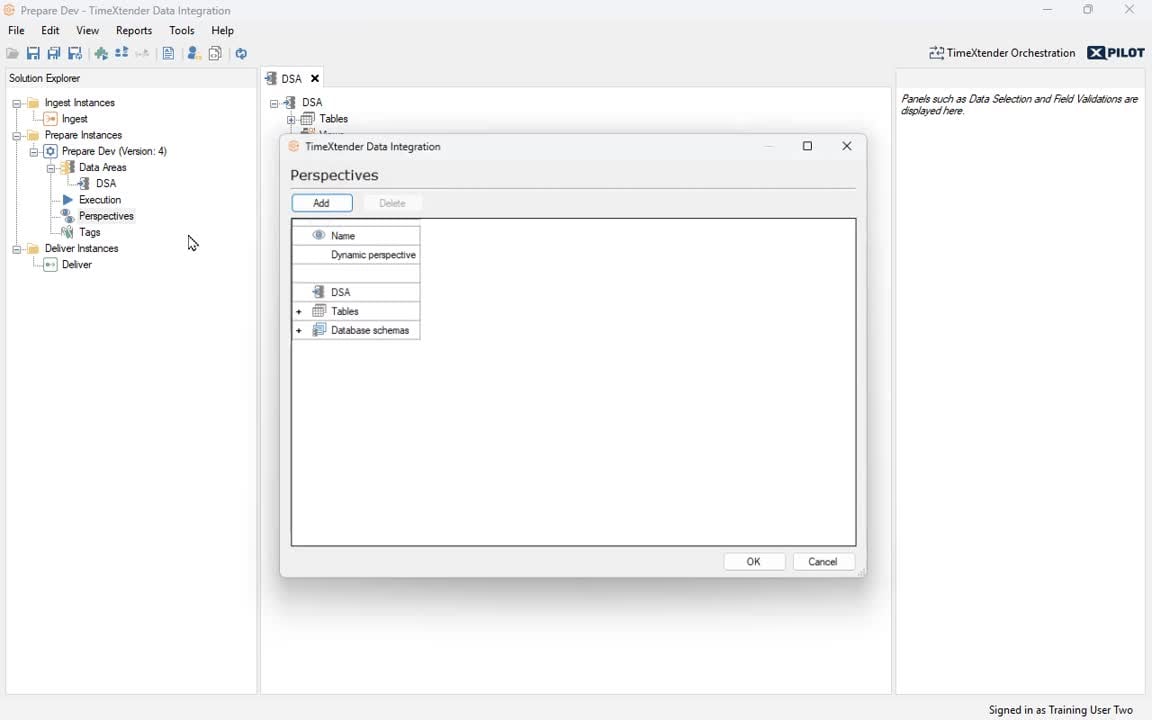
- Expand your Prepare instance in Solution Explorer and right-click Perspectives.
- Select Add/Edit Perspectives.
- Click Add in the Perspectives window.
- Rename your perspective by double-clicking its header.
- Choose the objects (for example tables) to include by checking their boxes.
- Optionally check Dynamic perspective to automatically include all dependent objects as well.
- Click OK. You'll see the new perspective in Solution Explorer.
- Right-click your new perspective → Use Dynamic Perspective. Notice the tables listed have changed.
- Right-click your new perspective → Deploy and Execute.
Creating promotion-specific full load packages
| Phase | What you do |
|---|---|
| Build | During development, when implementing changes that require a full load to see the results, add that table on the Full load objects tab of this package. |
| Test and deploy | During testing and after promotion, instead of executing the entire instance, execute this package — already scoped to your perspective — and it will full load all required tables. |
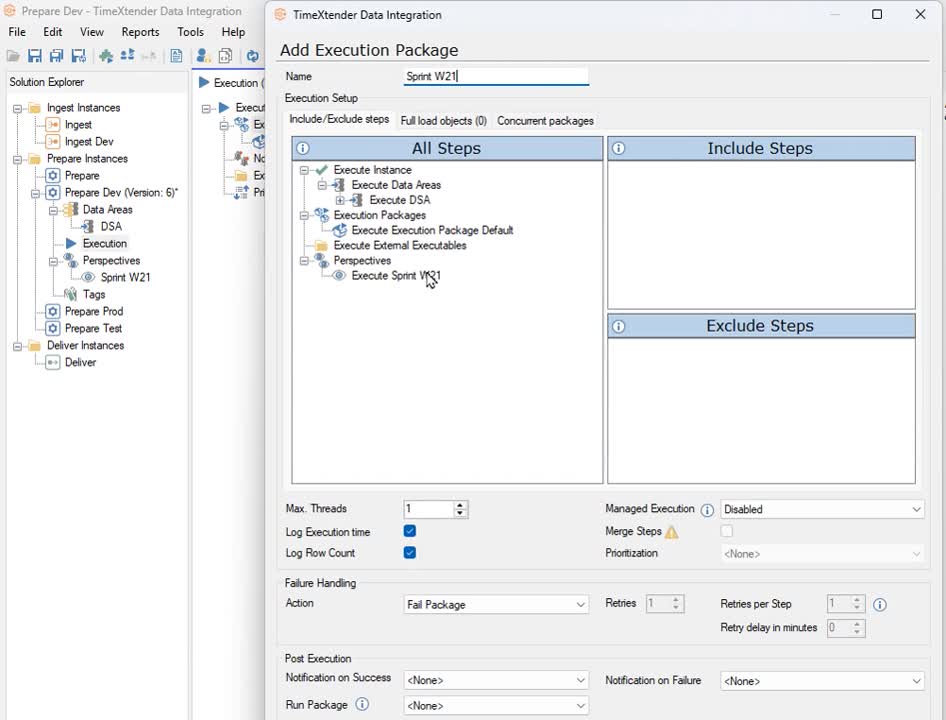
- Under the desired instance, double-click Execution.
- Right-click Execution Packages → Add Execution Package.
- Name it specifically for your sprint, for example
Sprint-3-Promotion-FullLoads. - Include your active project perspective in this package for scope alignment.
- During development, when adding changes requiring a full load: open this package → Full Load objects tab → add the desired tables.
- Continue tagging additional tables as full-load-required changes are introduced through the sprint.
- At promotion time, execute this package in the target environment to run full loads on all tagged tables.
Related reference
- Multiple Environments — the migration procedure this plan feeds into.
- Scheduled Executions — execution package components in detail.
- Prepare instance — where perspectives are defined.
Discussed in the community
Looking for related questions…
Didn't find your answer? Ask the community about this page — questions are answered by Timextender experts, partners and other users.