Semantic Model Endpoints
Adding endpoints to your Deliver instance.
In this module: CSV · Tabular · Power BI · Tableau · REST endpoints
What are endpoints?
Endpoints are the publishing mechanisms that deliver semantic models to analytics platforms and consumption channels — multiple distribution pathways for a single governed data model, each tailored to particular BI tools and user needs.

A single semantic model can support several endpoints simultaneously, keeping business definitions and metrics consistent across Power BI, Tableau, Qlik, CSV exports and REST APIs. That maintains one version of truth while accommodating different organizational requirements.
The key to choosing endpoints is aligning with the tools your business users prefer and your organization's IT and data governance strategy: minimise friction for consumption while supporting your long-term analytics architecture.
Reference: CSV Endpoint · Tabular Endpoint · Power BI Premium Endpoint · Qlik Endpoint · Tableau Endpoint · REST API Endpoint
CSV endpoint
A CSV endpoint is a simple way to export data in a widely compatible format — useful when you need to share data outside typical analytics tools, meet regulatory requirements, or integrate with systems that don't support direct connections.
You configure the CSV endpoint while setting up the Deliver instance, as covered in the Portal module.
Deploy and execute
- Right-click the Deliver instance → Deploy and Execute.
- Right-click the CSV endpoint → Open Directory.
- Explore the files.
Microsoft's analytics stack — understanding your options
Microsoft's VertiPaq engine powers three analytically equivalent platforms:
- SQL Server Analysis Services (SSAS)
- Azure Analysis Services
- Power BI datasets, now Fabric Semantic Models
All three share the same columnar, in-memory architecture introduced in SSAS 2012, so performance is consistent whether consumed through Power BI or Excel.
When to choose the Tabular endpoint
- On-premises strategy. Choose Tabular when you maintain on-premises infrastructure, especially if you already use SQL Server for Prepare storage. You get enterprise-grade semantic modelling with full control of your analytical infrastructure.
- Cloud migration path. Tabular also integrates with Azure Analysis Services, which makes it a good choice when moving to cloud analytics while keeping familiar development workflows.
When to choose the Power BI endpoint
- Fabric-first organizations. With Fabric capacity (F-SKU) licensing, the Power BI endpoint (Fabric Semantic Models) is the optimal choice — Microsoft's latest investments align there.
- Traditional licensing. Without Fabric capacity you can still use shared VertiPaq models via on-premises SSAS or Azure Analysis Services, with the same analytical performance under a different deployment and licensing model.
The deciding factor
Fabric capacity → Power BI endpoint. Otherwise → Tabular endpoint.
SSAS Tabular endpoint
This endpoint supports SQL Server Analysis Services on-premises, or Azure Analysis Services in the cloud. Choose it when reporting in Power BI or Excel over on-premises SQL Server or Azure SQL Database storage, and you want to preserve familiar SSAS workflows.
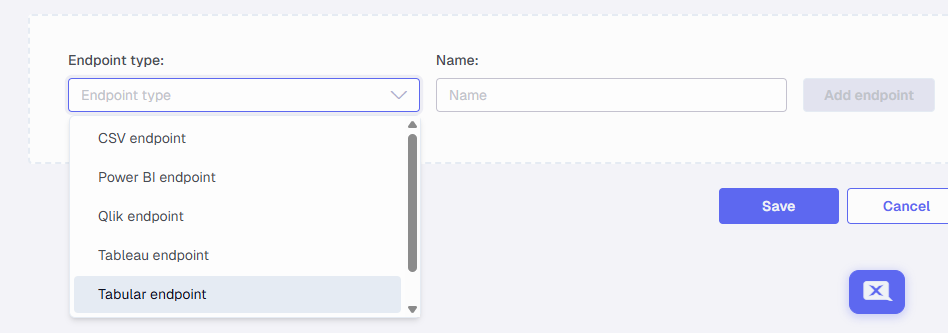
Create the endpoint in the Portal
- Click Data Estate → Instances.
- Open the Sales instance and click Edit.
- Add an endpoint: select Tabular Endpoint and click Add.
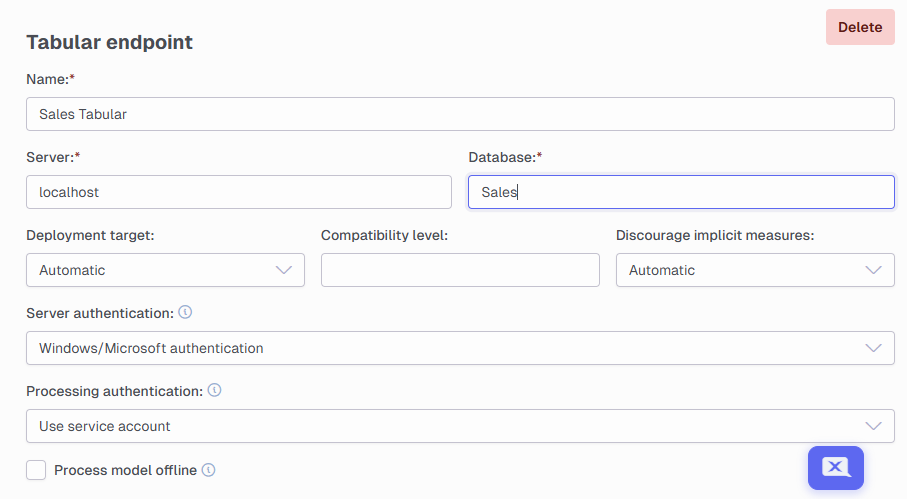
- Name:
SalesTabular - Server:
Localhost - Database:
Sales - Click Save.
Deploy and execute
Refresh, then deploy and execute the Deliver instance.
Connect Power BI
- Click Get Data → Analysis Services.
- Server:
localhost, then OK. - Select Sales → SalesDev.
- Click Models to see the complete relationship diagram.
- Build a dashboard.
Reference: Use Azure Analysis Services · SSAS Perspectives · Calculation Groups
Next in the course
Discussed in the community
Looking for related questions…
Didn't find your answer? Ask the community about this page — questions are answered by Timextender experts, partners and other users.