Data Cleansing
Implementing data cleansing rules and monitoring overall data quality.
In this module: data validation rules · data selection rules · data transformation · monitoring and continuous improvement
What is data cleansing, and why does it matter?
Data cleansing is identifying, correcting or removing inaccurate, incomplete or irrelevant data. It is the step that makes data used in analytics and reporting trustworthy. High-quality data unlocks accurate insight, supports regulatory compliance and reduces the risk of costly business errors.
Where it fits in the workflow:
| Stage | What happens |
|---|---|
| Ingest | Bring in raw data from varied sources. |
| Prepare | Cleanse, validate and enrich data to create a single source of truth. |
| Deliver | Publish only clean, reliable data for BI, reporting or advanced analytics. |
| Monitor and improve | Continuously assess and improve quality, through monitoring or a dedicated Data Quality solution. |
Data validation
Validation checks each piece of data against your organization's standards: unique primary keys, referential integrity between related tables, and custom field-level rules.
- Primary key validation removes or flags duplicates, empty keys and missing identifiers, preventing analytical errors and keeping every record unique and traceable.
- Referential integrity ensures relationships between tables are correct — every sales record must match an existing customer. Invalid records are flagged or removed and can be logged. Physically enforced relations also apply those rules in downstream databases and tools.
- Validation rules let you define criteria such as Is Not Null, Min Length or In List. Violations are flagged as an error or a warning, so only business-ready data moves forward.
Strong validation stops bad data spreading across systems, reducing rework and letting stakeholders rely on the output for operational and regulatory needs.
Primary key validation
Timextender can check or remove duplicate and empty primary keys, and show the results. By default, primary key behaviour is set to error at instance level, which removes any record with a null or duplicate primary key.
| Behaviour | Effect |
|---|---|
| Error | Invalid records are removed from the valid table during execution. Each appears in the Errors report. |
| Warning | Invalid records remain in the valid table. Each appears in the Warnings report. |
| None | Duplicate or empty primary keys are neither removed nor flagged. |
Instance level — affects every table in the instance:
- Right-click the MDW instance → Edit Instance.
- Under Primary key violation, select the option you want.
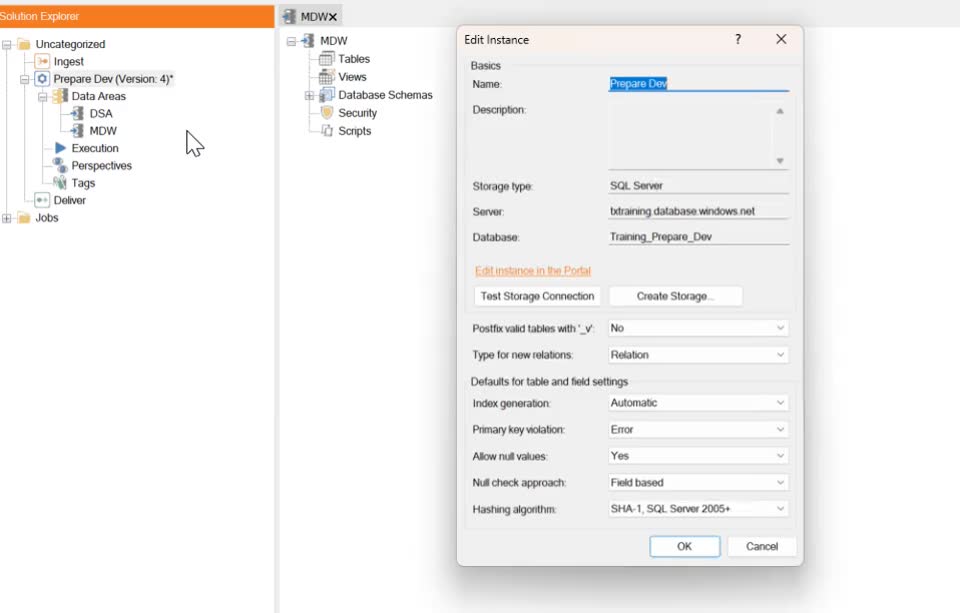
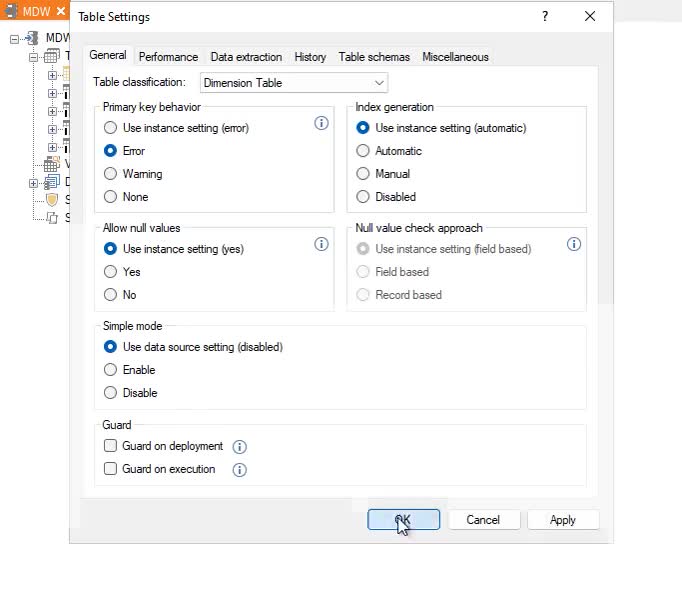
Table level — overrides the instance setting for one table:
- Right-click the table → Table Settings.
- On the General tab, select the primary key behaviour.
Reference: Primary Keys · Set up Primary Key Rules
Referential integrity
Timextender can use defined relations to perform a referential integrity — foreign key constraint — check. During execution it compares primary and foreign key values to confirm a match exists. If not, the record is invalid. Four options control the handling:
| Option | Effect |
|---|---|
| Error | Records without a related primary key are removed from the valid table, and appear in the Errors report. |
| Error with physical relation | As Error, but the foreign key relation is also stored in the target database so other tools can see it. |
| Warning | Records without a related primary key remain in the valid table, and appear in the Warnings report. |
| Relation | The relation stays in place; referential integrity is not enforced. |
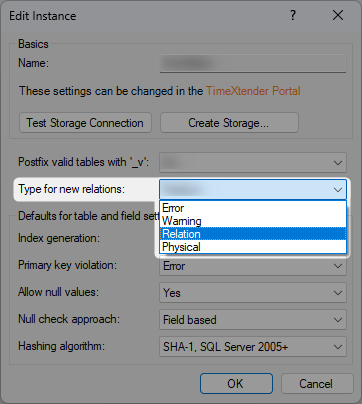
Instance level: right-click the MDW instance → Edit Instance → under Relation, select the option.
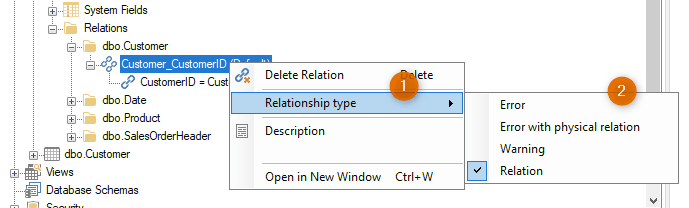
Table level: at the bottom of a table's field list, find the relation, right-click it → Relationship Type, and select the type for your use case.
Reference: Table relations
Validation rules
Validation rules discover invalid data and keep accuracy and reliability high. They apply at field level, and can be made conditional so they only apply in specific situations.

Supported operators:
| Operator | Checks |
|---|---|
| Is Null / Is Not Null | Whether the field is null |
| Is Empty / Is Not Empty | Whether the field is empty |
| Equal / Not Equal | Equality against a value |
| Greater than / Greater or equal | Field value above a threshold |
| Less than / Less or equal | Field value below a threshold |
| In List / Not In List | Whether the value appears in a list |
| Min. Length / Max Length | Length of the field value |
For every rule you must also classify the severity of a violation:
- Error — critical to data quality and requires immediate attention. The data is considered invalid and is not made available to end users.
- Warning — not critical and does not require immediate attention. The data is still considered valid and remains available.
Reference: Data Validation Rules · Data Selection Rules · Batch Data Cleansing
Next in the course
Optimization · Table Transformations
Discussed in the community
Looking for related questions…
Didn't find your answer? Ask the community about this page — questions are answered by Timextender experts, partners and other users.