Prepare Instance
The concepts of data warehousing: dimensional modelling, dimension and fact tables, and denormalization.
In this module: what the Prepare instance is · dimensional modelling · deployment and execution
What is the Prepare instance?
A data warehouse is a clean, organized repository of company data — usually in a relational database — designed to enable reporting across different systems. In Data Integration that concept is implemented as the Prepare instance. Three processes happen there before data reaches users:
| Process | Why it matters |
|---|---|
| Data consolidation | Organizations generate data in ERP software, CRM software, financial planning systems, text and Excel files. Combining these into a single unified view reduces the complexity of working across data sets. |
| Data cleansing | People pay closer attention to their core job than to data entry, which produces typos, duplicates and inaccuracies. Cleansing corrects these so the data is reliable for analysis. |
| Data modeling | Software stores data for computers, not people. Reorganizing it to match how people categorize and understand data also has strong implications for how efficiently databases can read and process large volumes. |
Together these make data accurate, consistent and unified into a "single version of the truth".
Why not connect Power BI, Tableau, Qlik or Excel straight to the source?
Even with automation, building a data warehouse takes real investment and buy-in across departments. If your source data is simple enough to extract value directly, skip the warehouse. But as companies grow, sources multiply and source data gets more complex — at that point a layer for consolidating, cleaning and modelling becomes essential to making timely decisions.
What is deployment and execution?
Deployment
Timextender creates or modifies tables, views and stored procedures in the target storage database. For Fabric it generates PySpark notebooks instead. Deployment is required whenever tables, views, fields or lookups are added or changed.
- Differential deployment. When enabled, Timextender works out which steps actually need deploying — altering the raw table, updating the cleansing procedure — and deploys only those. When disabled, everything is deployed.
- Managed deployment. When enabled, Timextender calculates dependencies and deploys objects in the optimal order. When disabled, you must get the order right yourself.
Execution
Timextender transfers and cleans data, producing a populated table. Afterwards the table can be previewed or queried. Execution can be run manually or on a schedule, and Timextender can execute multiple threads simultaneously — configured by editing the default execution package.
Generated objects
Deployment and execution generate several SQL objects, visible in SQL Server Management Studio. The table name without a postfix is the valid table.
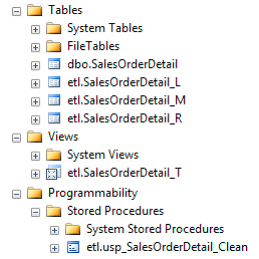
| Postfix | Contents |
|---|---|
_R |
All the raw data |
_T |
All the transformations |
_L |
Logs and errors |
_M |
All the messages |
With Microsoft Fabric, Timextender creates PySpark notebooks to manage data workflows and delta tables, working alongside traditional SQL objects.
Reference: Deploy tables · Execute tables · Execution Packages
What is dimensional modelling?
A well-established method for modelling large volumes of data so it is efficient to analyse, easier to understand, and resistant to changes in the source model. To understand it, you first need to understand how most software stores data.
The normalized model
To record data reliably, software minimises the number of places any fact is stored. Developers use a design called third normal form, or a normalized model, which reduces redundancy by splitting data across many separate tables — so an update touches the database in one place only.
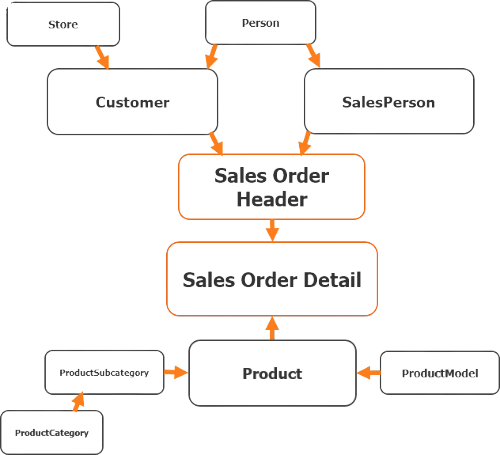
Efficient for software systems; much harder for humans to understand and analyse.
Denormalization
Denormalization combines related data from multiple tables by repeating lower-cardinality values in a single table. Take Product and Product Category: in the normalized model, products, categories and subcategories each appear once in their own table.
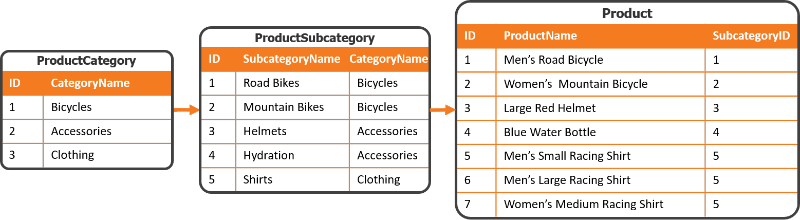
Cardinality
Cardinality is the relationship between the number of rows in one table and another. Above, Product has more rows than ProductCategory, so Product has the higher cardinality.
During denormalization, tables are joined, inserting the lower-cardinality values directly into the final higher-cardinality table. Those values repeat, and all the contextual information ends up in one table — a dimension — with a clearly defined grain.
Grain
The grain, or granularity, of a table defines what each row represents. Above, the Product table's grain is each individual product sold or consumed. When designing a dimensional model, define granularity first.
Reference: Data Transformation · Table relations · Conditional Lookup Fields
Next in the course
Product Dimension · Customer Dimension · Sales Transactions
Discussed in the community
Looking for related questions…
Didn't find your answer? Ask the community about this page — questions are answered by Timextender experts, partners and other users.