Enterprise Architectures
Timextender provides multiple, scalable reference architectures for enterprise analytics. Choosing the right option depends on workload requirements and alignment with the organization's technology strategy. This module gives selection tips and configuration guidance across the recommended enterprise architectures.
In this module: Azure SQL architecture · Snowflake architecture · Fabric architecture

Azure SQL Database — Hyperscale
Azure SQL Database is ideal for organizations that have an Azure cloud-native strategy, prefer a more IT-governed environment, are familiar with SQL Server, and want high reliability across data sizes up to 100 TB. The Hyperscale compute tier provides maximum scalability and best-in-class IO and transaction log throughput, which suits data warehouse workloads.
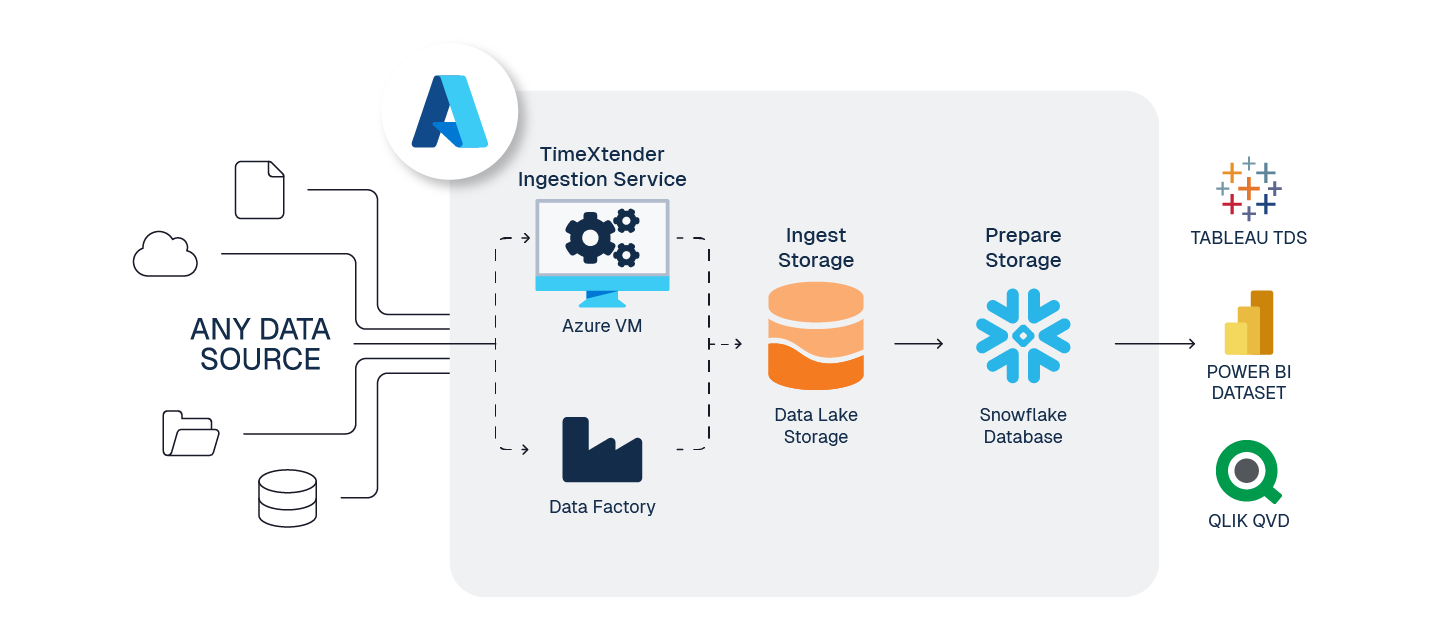
Development Prepare storage
- Use the General Purpose service tier with Serverless compute.
- Configure auto-pause duration to 1 hour, so the database incurs only minor storage cost and $0 compute cost when not in use.
- Configure max vCore to the lowest acceptable performance, and match min vCore to the same level — vCore scaling can cause failed runs.
- Use retries with 2–3 minute delays to allow the database to resume.
Production Prepare storage
- Use the Hyperscale service tier with Provisioned compute and Premium-series hardware.
- Hyperscale with Premium-series hardware provides the best log throughput (150 MiB/s) of any SQL DB tier, resulting in the best performance for Timextender ETL workloads.
- Start with 4 vCores and scale up as needed.
- Serverless can scale compute automatically during scheduled execution to save cost, but connections can drop during scaling. Either configure execution retry logic, or use Provisioned for more reliable workloads.
- Instead of relying on Serverless scaling, use the Orchestration Cloud Optimizer package or PowerShell to trigger a scale-up before scheduled executions and scale back down on completion.
Ingest storage
When configuring this architecture, most customers choose Azure Data Lake Gen 2 for Ingest storage, because of its low cost and scalability. SQL Database also works for Ingest storage, but it adds cost without additional functionality.
Transfer from the Ingest instance
Azure Data Factory adds cost, but gives the best performance for large workloads when transferring data from the Ingest instance to the Prepare instance:
- Edit the Prepare instance.
- Scroll to the bottom.
- Select Azure Data Factory from the Technology drop-down.
- Enter the requested ADF connection details.
Additional optimization
Targeted indexing, table compression and partitioning can further optimize large data workloads. Consider experimenting with the following to see whether they improve performance:
- Enable batch data cleansing on long-running tables with a significant number of lookups.
- Perform all data transformation and validation in the DSA layer, so you can use Simple Mode and incremental load in the DWH presentation layer.
- Page-based compression on large dimension tables.
- Non-clustered indexes on common join and filter columns.
- Clustered columnstore indexes on large fact tables.
Read more in Optimization.
Real-time monitoring
Run this query on the target database as Admin:
SELECT
    r.session_id,
    r.status,
    r.cpu_time,
    r.total_elapsed_time,
    r.wait_type,
    r.granted_query_memory,
    r.dop,
    qs.total_logical_reads,
    qs.total_logical_writes,
    qs.total_worker_time,
    SUBSTRING(st.text, (qs.statement_start_offset/2)+1,
        ((CASE qs.statement_end_offset
            WHEN -1 THEN DATALENGTH(st.text)
            ELSE qs.statement_end_offset
          END - qs.statement_start_offset)/2) + 1) AS statement_text,
    qp.query_plan
FROM sys.dm_exec_requests AS r
LEFT JOIN sys.dm_exec_query_stats AS qs
    ON r.plan_handle = qs.plan_handle
CROSS APPLY sys.dm_exec_sql_text(r.sql_handle) AS st
CROSS APPLY sys.dm_exec_query_plan(r.plan_handle) AS qp
ORDER BY r.cpu_time DESC;
Snowflake
Snowflake is ideal for organizations seeking a cloud-native data warehouse with automatic usage-based scaling of compute and storage. Multi-cloud compatibility across AWS, Azure and GCP provides deployment flexibility, while the platform's architecture separates compute and storage for cost and performance optimization. It suits medium to large data solutions, and organizations where data volume growth is uncertain or rapidly expanding.
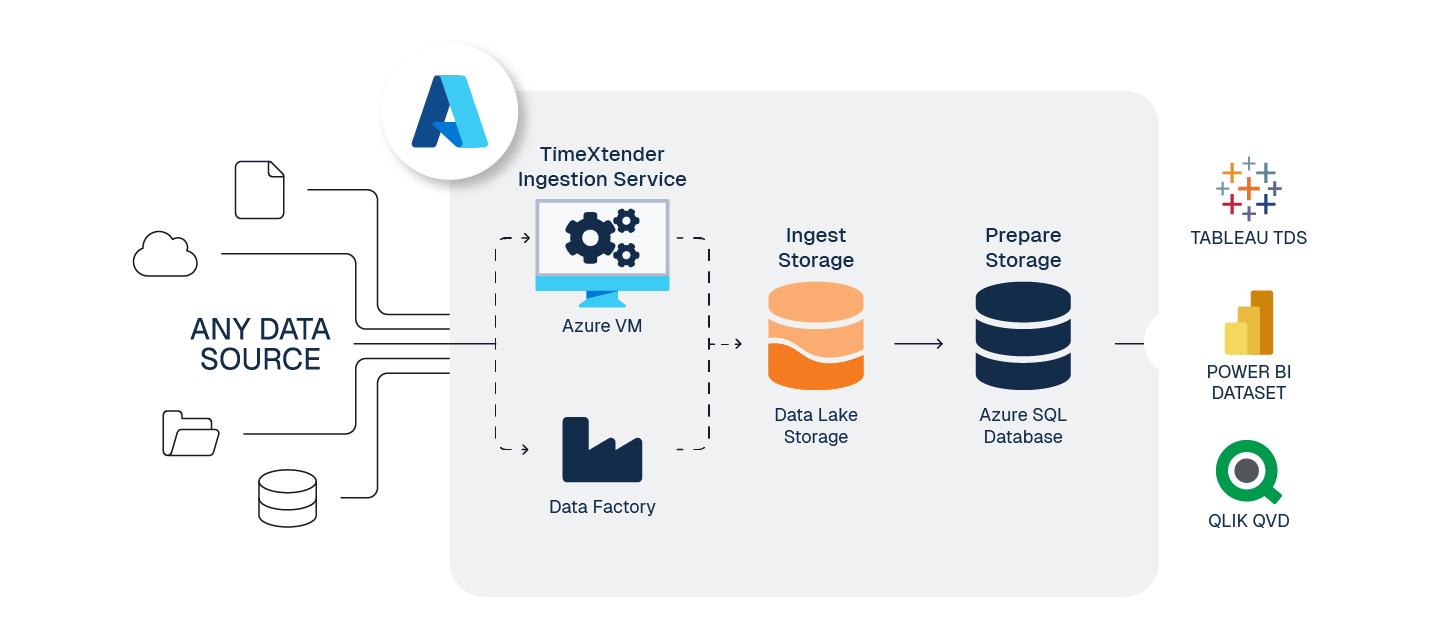
Development Prepare storage
- Use the X-Small warehouse with auto-suspend enabled.
- Configure auto-suspend duration to 1 minute to minimize compute costs during idle periods.
- Configure a max cluster count to prevent unexpected costs during development.
- Use time travel with 1-day retention for development environments, to balance recovery capability against storage cost.
Production Prepare storage
- Use Small to Medium warehouses with auto-scaling enabled.
- Automatic provisioning of compute based on query demand gives consistent performance for production workloads.
- Serverless scaling lets compute scale down during low activity and up when needed.
- Start with a Small warehouse (2 credits/hour) and monitor usage patterns to determine optimal sizing.
- Multi-cluster warehouses can scale out automatically for concurrent user workloads — implement max cluster limits to control costs.
- Configure 3-day time travel retention for production systems, balancing recovery needs with storage cost.
Ingest storage
Snowflake recommends loading from cloud storage. With ADLS as the landing zone, Timextender automates parallel, scalable ingestion through external stages, gives fast pipelines, and preserves a governed, reusable raw data layer.
Transfer from the Ingest instance
Timextender auto-executes Snowflake's COPY INTO command for ingesting Parquet files from Azure Data
Lake, enabling optimized per-file parallelism, pruning and compression for maximum throughput.
To give Snowflake access, you must provide an ADLS SAS token:
- In Azure Storage Explorer or the Portal, open the ADLS container or folder and select Generate SAS.
- Copy the SAS query string (it starts with
?sv=…). - Edit the Ingest instance in the Timextender Portal and paste in the Azure SAS token.
Additional optimization
- Unlike traditional SQL databases, Snowflake automatically optimizes warehouse tables for maximum performance.
- Query result caching is enabled by default and can dramatically reduce compute costs for repeated or similar queries across users.
- Automatic compression is handled by Snowflake without user intervention, typically achieving 3–4× compression ratios.
- Data clustering on frequently filtered columns improves query performance and reduces compute consumption for large tables.
- Warehouse suspension policies should align with usage patterns — aggressive suspension for intermittent workloads, less aggressive for steady workloads.
Real-time monitoring
Monitor warehouse usage with Snowflake's native Account Usage views:
SELECT
    warehouse_name,
    sum(credits_used) as total_credits,
    avg(avg_running) as avg_load
FROM snowflake.account_usage.warehouse_metering_history
WHERE start_time >= dateadd(day, -7, current_timestamp())
GROUP BY warehouse_name
ORDER BY total_credits DESC;
Microsoft Fabric — Database
Microsoft Fabric SQL Database is a fully managed, always-current relational engine tightly integrated with OneLake. It suits teams standardizing on Fabric who want governed SQL semantics, automatic scaling and native mirroring for downstream Fabric services, while Timextender orchestrates ELT to minimize capacity consumption and accelerate delivery.

Ingest storage
Use Fabric Lakehouse as the landing zone. Timextender writes compressed Parquet/Delta to OneLake, enabling scalable storage and native interoperability across Fabric engines before loading curated models into Fabric SQL Database.
Transfer from the Ingest instance
Timextender reads Parquet/Delta files from the Ingest Lakehouse and loads them into Fabric SQL Database or the Prepare Lakehouse using generated, push-down code and orchestrated batches, reducing movement and compute while keeping data in OneLake for downstream analytics.
Performance tuning and monitoring
Monitor with Fabric's Performance Dashboard and DMVs; track CPU/IO via sys.dm_db_resource_stats and
analyze active requests and sessions for bottlenecks.
Additional optimization
- Use Timextender push-down ELT and batch orchestration to reduce capacity usage and improve throughput on scheduled pipelines.
- Leverage automatic tuning for plan correction and index management inherited from Azure SQL, to improve query performance continuously.
- Separate workspaces and environments by lifecycle, and apply least-privilege access through service principals for governed operations.
- Use the Fabric Capacity Metrics app and utilization reports to track Capacity Unit Seconds (CUs), identify throttling, and align workloads with pause/resume schedules for cost control.
Fabric Lakehouse
Microsoft Fabric Lakehouse combines the flexibility of a data lake with the structure of a data warehouse, using Delta Parquet storage in OneLake and Spark for compute. It is ideal for organizations embracing Spark-based data engineering, requiring advanced analytics capabilities, or transitioning from traditional SQL-only environments to modern distributed computing frameworks.
What's Spark?
Spark is a distributed compute engine. Instead of one machine processing all rows, Spark splits data into partitions and processes them in parallel on a temporary cluster:
- Spark cluster — a set of driver and executor nodes created on demand in Fabric to run a job.
- Spin-up time — expect a 1–3 minute wait the first time a job runs, or after a long idle period. Fabric must allocate capacity, start the cluster and cache libraries. Subsequent jobs reuse the warm cluster and start faster.
Medallion architecture
| Layer | How it maps |
|---|---|
| Ingest — Bronze | The Ingest layer with Lakehouse storage acts as the Bronze layer. Data is stored in open Delta Parquet, enabling fast columnar access, ACID transactions, time travel and schema evolution. |
| Prepare — Silver | The Prepare layer should target a separate Lakehouse in the same workspace. Configure Simple Mode at the data area level and disable it only on tables requiring transformation — that deploys zero-copy table shortcuts referencing the Bronze layer, materializing tables only when transformation is needed. |
| Deliver — Gold | Timextender semantic models act as the Gold layer, with relational data stored as a Power BI dataset. Use Direct Lake on OneLake so Power BI reads your OneLake Parquet files directly while keeping refresh speeds similar to import. |
Deploy and execute differ in Spark
- Deploy creates Spark notebooks. Timextender generates notebooks (similar to a SQL stored procedure) for each object — tables and steps. These notebooks contain PySpark and Spark SQL.
- Execute runs the notebooks. When executed, notebooks perform the transformations and create or update the Delta tables in the Lakehouse.
- SQL-based field transformation. Most field-level transformations (cast, joins, filters, aggregates) remain defined in SQL in Timextender and are deployed as Spark SQL in notebooks.
- Customize code for advanced needs. Use Customize Code to add PySpark cells to the generated notebooks for logic beyond Timextender's supported features — complex UDFs, windowed file processing, or performance-specific tuning.
Monitoring in Fabric
To monitor and track Spark job performance:
- Open the Monitor hub in the left nav bar — from here you can see the run activity of any Fabric workload.
- Use the filter to select Notebooks.
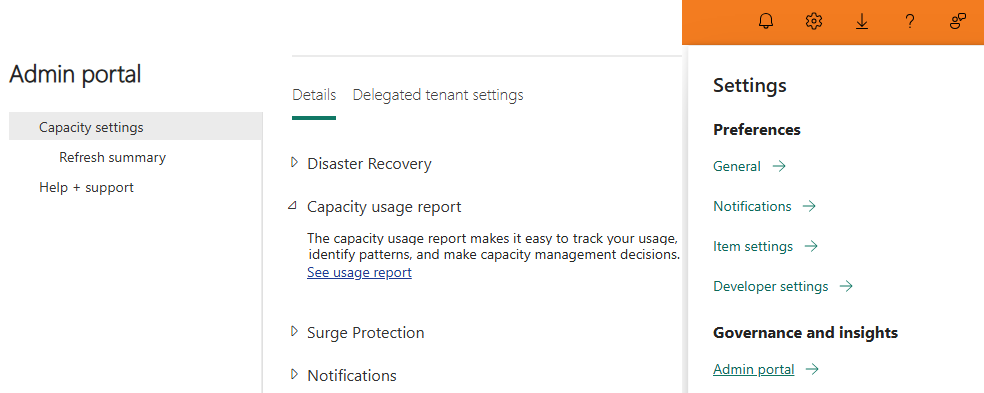
To track capacity usage in the Fabric usage report: Settings → Admin Portal → Capacity Settings → Capacity Usage Report → click the hyperlink.
Related reference
- Optimization — the tuning settings referenced throughout this module.
- Install and configure — provisioning storage for these architectures.
- Multiple Environments — separating workspaces by lifecycle.
Discussed in the community
Looking for related questions…
Didn't find your answer? Ask the community about this page — questions are answered by Timextender experts, partners and other users.